
To withdraw earnings in Niki Live, go to the Me section, open My Account, tap the My earnings block, and select Withdraw. From there, you can review your available beans, choose a withdrawal method, enter the amount, and submit the request from the app.
In-app withdrawal · Beans to USD · Available methods · Fees and processing times
In this guide
How to withdraw earnings step by step
These are the general steps to request a withdrawal from Niki Live:
- Open Niki Live and log in.
- Go to the Me menu or your profile.
- Tap the My Account section.
- In the earnings block, tap My earnings.
- Select Withdraw.
- Choose or link a withdrawal method.
- Enter the amount you want to withdraw.
- Review fees, estimated processing time, and confirm the request.
Important note: use Withdraw to cash out your earnings. Redeem or Exchange only converts beans into the app’s internal coins.
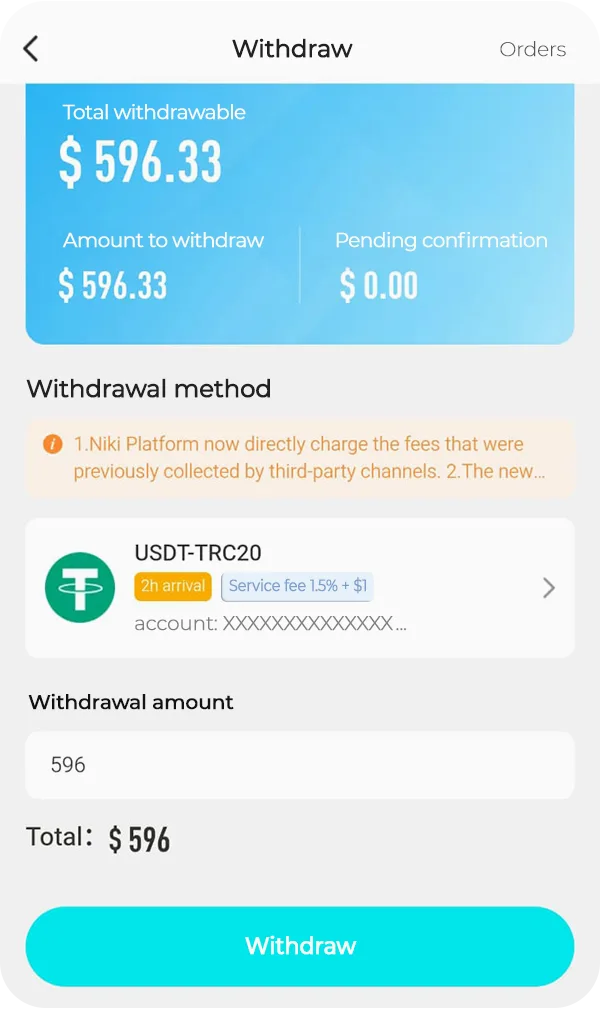
Beans to USD conversion
In Niki Live, earnings are displayed as beans. According to the rules shown in the app, the general conversion is:
- 10,000 beans = 1 USD
- 100,000 beans = 10 USD
The minimum amount may change depending on the withdrawal method, country, and active platform rules.
Available withdrawal methods
Available methods may vary depending on the country, account, and in-app availability. In Niki Live, go to Withdrawal Method to review which options appear, link your preferred one, and confirm processing times, minimums, and fees before withdrawing.
- USDT-TRC20: cryptocurrency withdrawal using the TRC20 network.
- Epay: an option available for some accounts.
- USDT-BEP20: withdrawal through the BEP20 network, if available.
- Binance: may appear as an option, although it may be limited or unavailable on some accounts.
- Bank card: may appear in some countries.
- PayPal: may be available depending on the region.
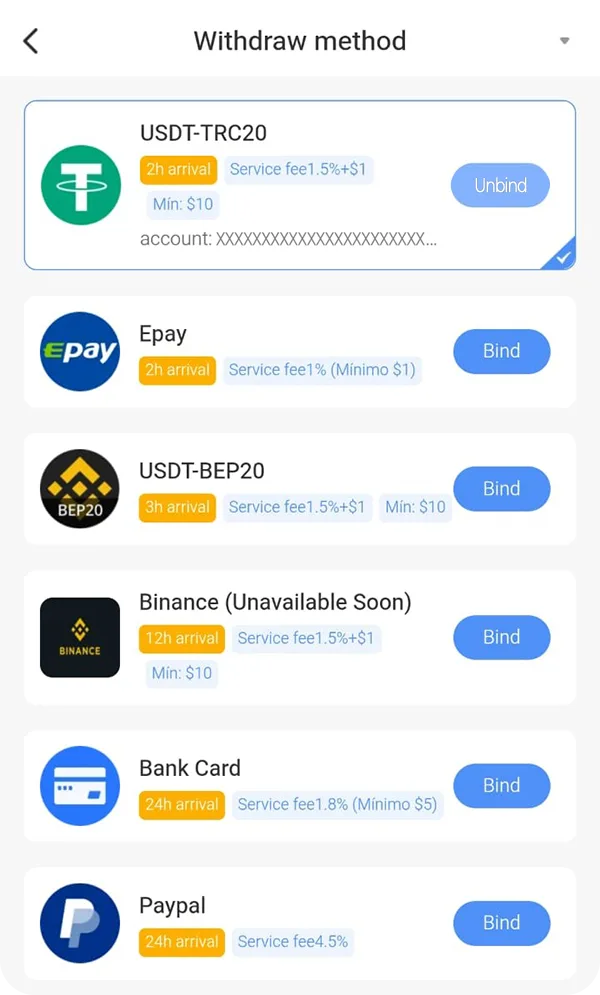
Withdrawal fees and processing times
Before confirming a withdrawal, always review three details inside the app:
- Minimum amount: each method may have a different minimum.
- Service fee: some methods deduct a fixed or percentage-based fee.
- Arrival time: the payment may take from minutes to several hours or more, depending on the method.
It is also important to carefully confirm the account, wallet, or withdrawal address. If you use cryptocurrency, an incorrect address may make the money unrecoverable.
Common issues when withdrawing earnings
- The Withdraw button does not appear: check whether you have an available balance and make sure you first open My earnings.
- The method is not available: this may depend on the country, account, or active rules.
- The withdrawal does not move forward: verify that you meet the minimum amount and that the method is linked.
- The USDT address is wrong: do not confirm the withdrawal until you review the network and address.
- The payment takes time: some methods may take longer due to validation, blockchain network processing, or an external provider.
Not a Niki Live agent yet?
To withdraw earnings as an agent, you must have an active account and access the Agent menu within the app. If you haven’t done so yet, first check how to register as a Niki Live agent.
Frequently Asked Questions
-
How many beans equal 1 USD in Niki Live?
The app shows a general conversion of 10,000 beans = 1 USD. For example, 100,000 beans equal 10 USD. Even so, before withdrawing, always review the rules visible in your account.
-
What is the minimum amount to withdraw earnings in Niki Live?
The minimum may vary depending on the withdrawal method available in your account. For some methods, the app may show a minimum of 10 USD, but you must confirm it directly on the withdrawal screen before submitting the request.
-
What is the difference between Withdraw and Redeem or Exchange?
Withdraw is used to cash out your earnings to a payment method. Redeem or Exchange is used to convert beans into the app’s internal coins, not to send money to an external account.
-
What withdrawal methods does Niki Live have?
Methods may vary depending on the country and account. In the app, options such as USDT-TRC20, USDT-BEP20, Epay, Binance, bank card, or PayPal may appear, depending on availability.
-
How long does a Niki Live withdrawal take?
The time depends on the method used. Some methods may show estimated times of a few hours, but payment may also take longer due to validations, blockchain network processing, or external providers.
-
Why does the Withdraw button not appear?
This can happen if you are not entering from My earnings, if you do not have enough balance, if you do not meet the minimum withdrawal amount, or if your account does not yet have a linked payment method.
-
What happens if I enter my USDT address incorrectly?
If you use USDT, carefully review the network and address before confirming. An incorrect address may make the money unrecoverable, especially with cryptocurrency withdrawals.