Inviting agents in Niki Live allows you to expand your network with people who can also add hosts and invite new agents. From your agent options, you can copy your invitation link and share it with anyone who wants to register.
In the app, this option may appear as Invite Sub-Agent. When the person completes registration using your link, you will be able to see them in your sub-agent list and review their activity from the app.
Agent menu · Invite Sub-Agent · Invitation link · Sub-agents
In this guide
Before inviting agents
Before inviting other agents, make sure your Niki Live agent account is active.
- Active agent account: you need access to the agent features.
- Invite Sub-Agent: from this option, you can copy your link.
- Invitation link: the person must register using your link.
- Niki Live account: the invited person must have an account and their user ID.
Invite agents step by step
The process consists of copying your personal invitation link and sharing it with the person you want to connect to your network.
- Open Niki Live
Log in to your account from the app. - Open the Agency menu
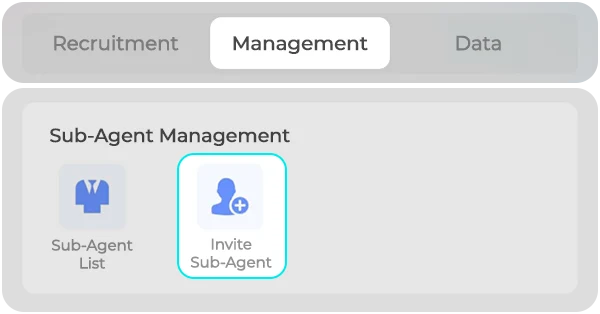
From your profile, tap the Agency option. - Find Invite Sub-Agent
Inside Management, open Invite Sub-Agent. - Copy your link
Use the invitation link generated by the app. - Share it
Send it through WhatsApp, Messenger, Facebook, Telegram, or your website. - Ask them to complete registration
The invited person must open your link and complete the form.
Important: the person must use your invitation link. If they register through another link or from another agency, they may not be linked to your network.
Invited agent registration
To be linked to your network, the invited person must open your link and complete the registration form. They will usually need their Niki Live user ID and a verification code sent inside the app.
- Open the invitation link.
- Enter their Niki Live user ID.
- Request the verification code.
- Check official messages inside the app.
- Enter the code received.
- Submit the form to complete registration.
Once registration is completed successfully, you can review the new agent inside your sub-agent list.
View invited agents
After inviting agents, check the sub-agent list to confirm they are linked to your network. From there, you can see their performance, number of hosts, invited agents, and commission level.
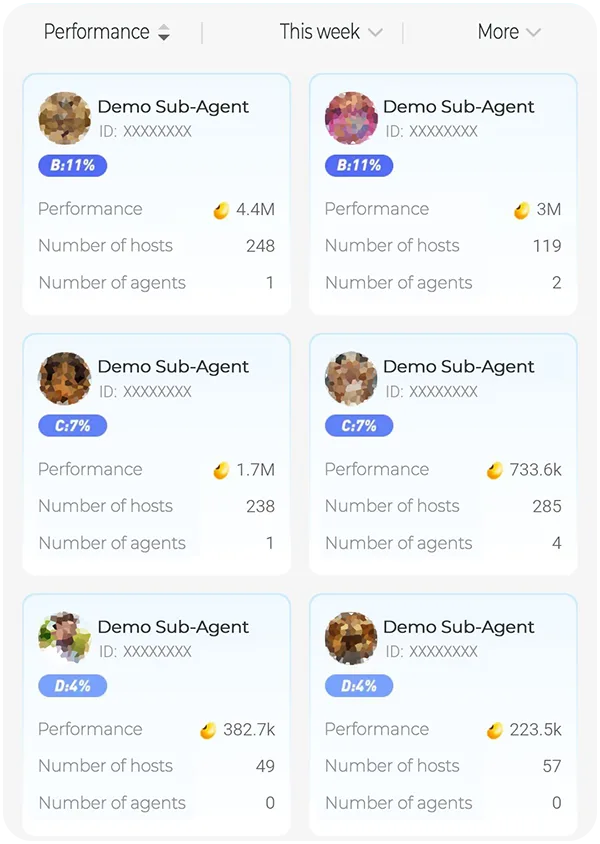
- Sub-agent list: shows the agents connected to your network.
- Commission level: shows the percentage assigned based on performance.
- Performance: shows the activity generated by each agent.
- Number of hosts: lets you see how many hosts each agent has.
- Number of agents: shows how many agents each sub-agent has invited.
Commissions from invited agents
Commissions from invited agents depend on the difference between your commission level and the invited agent’s level. That difference is applied to the performance generated by that agent’s network.
Simple example: if your percentage is higher than the invited agent’s percentage, you may receive a commission for the difference applied to their network’s performance.
From the sub-agent list, you can review each linked agent’s performance, number of hosts, and level.
Common issues
If an invited agent does not appear in your list, first check that they used your correct link and completed the registration form.
- They did not use your link: they may remain outside your network.
- Incorrect ID: the form may fail if they enter their ID incorrectly.
- Expired code: they must request a new code if the previous one expired.
- Incomplete form: they must submit the request correctly.
Not an agent yet?
To invite agents, you need an active Niki Live agent account. If you do not have one yet, first review how to register as a Niki Live agent, then return to this guide.
Frequently asked questions
-
What does inviting agents on Niki Live mean?
Inviting agents in Niki Live means sharing your invitation link so another person can register as an agent or sub-agent within your network. Once connected, they can add hosts, invite other agents, and generate activity.
-
Where do I find the option to invite agents?
The option is inside the app’s Agency menu. In the management section, it may appear as Invite Sub-Agent.
-
Does the invited person need to use my link?
Yes. To be linked to your network, the person must register using your invitation link. If they use another link or register from another agency, they may not appear in your sub-agent list.
-
What does the person need to register as an invited agent?
They usually need a Niki Live account, their user ID, the verification code requested inside the form, and access to the app’s official messages to complete registration.
-
Where can I see the agents I invited?
You can review them from the sub-agent list inside the Agency menu. There, you can see linked agents, number of hosts, performance, and commission level.
-
Do I earn commissions from invited agents?
You can generate commission from invited agents’ activity based on your level, the sub-agent’s level, and their network’s performance. The app calculates this data inside the agency menu.
-
Why does an invited agent not appear in my list?
This can happen if they did not use your link, entered their ID incorrectly, did not complete the form, the code expired, or the account was already linked to another agency.